
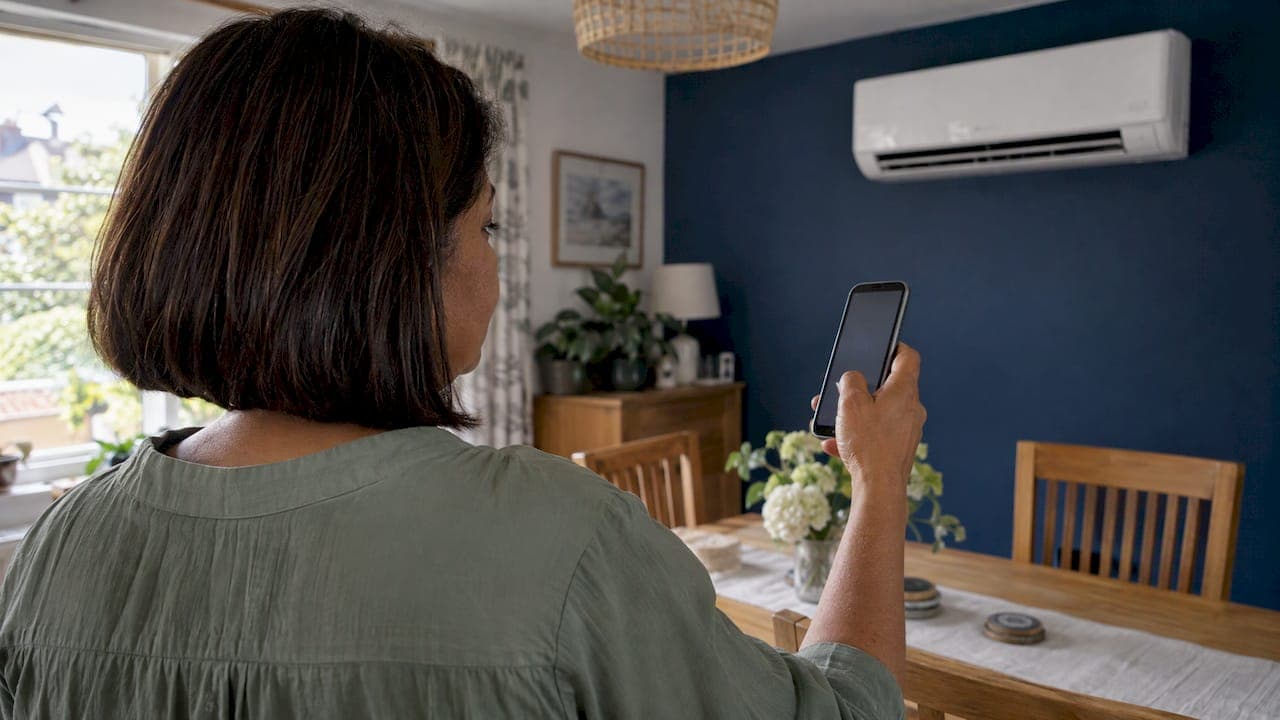
There are three ways to control an air conditioner from your phone. You can buy a unit with Wi-Fi built in, add the manufacturer's plug-in adapter, or fit a universal controller that copies your handset's infrared signals. For a new installation, built-in Wi-Fi or the maker's own adapter is usually the tidiest route. A retrofit controller is the fallback for a unit you already own.
This guide covers how each route works, what you can actually control, how to connect it, and the limits worth knowing before you choose.
TL;DR
- Built-in Wi-Fi uses the manufacturer's app, such as Daikin Onecta, and is the most reliable choice for a new system.
- Some ranges need an optional adapter rather than having Wi-Fi built in, so check before you buy.
- A retrofit infrared controller can add phone control to an older unit, but compatibility varies, so follow the maker's compatibility guidance.
- Most home Wi-Fi problems come down to the router band, signal strength or the app's cloud service. Keep a handset as a backup.
- If you are fitting a new system in Devon or Cornwall, we can specify and set up Wi-Fi control as part of the installation.
Table of Contents
- The three ways to add phone control
- Option one: built-in Wi-Fi and the manufacturer's app
- Option two: a plug-in adapter
- Option three: a universal retrofit controller
- What you can control from the app
- How to connect your air conditioner to Wi-Fi
- Limits worth knowing before you choose
- Which option suits your home?
- Perspective
- Get Wi-Fi control fitted with your system
- FAQ
- Sources
The three ways to add phone control
Every option does the same job: a small piece of hardware joins your home Wi-Fi, and an app on your phone sends commands through it. The difference is where that hardware sits and who made it.
| Option | How it works | Best for | Main watch-out |
|---|---|---|---|
| Built-in Wi-Fi | Wi-Fi module is part of the indoor unit; you use the maker's app | New installations | Features differ by model |
| Manufacturer's adapter | Plug-in module (sometimes called a dongle) fitted to a compatible unit | Ranges without built-in Wi-Fi | Not every model accepts one |
| Universal retrofit controller | Sits facing the unit and sends the same infrared signals as your handset | Older units with no Wi-Fi option | Compatibility and reliability can vary |
The distinction between built-in and plug-in is a genuine one. Hitachi, for example, notes that some models require an airCloud adapter for its airCloud Go app to work. Always confirm with the installer whether the exact model you are buying has Wi-Fi built in, or whether the adapter is an extra part.
If you want the wider background on how smart systems fit together, our homeowner's guide to what smart air conditioning is is a good companion read.
Option one: built-in Wi-Fi and the manufacturer's app
This is the route we recommend for most homes. The module is designed for the unit, the app is written by the people who made the unit, and the manufacturer maintains both.
Daikin UK says its Onecta app can control compatible climate systems from any place at any time. Its page also lists energy monitoring, multi-room control and optional Amazon Alexa or Google Assistant control, with functions varying by unit. Mitsubishi has its own app and cloud service, MELCloud, and Hitachi has airCloud Go. LG uses ThinQ, and its UK page explains that you download the app, sign in and add your appliance. GENERAL's UK support page makes the same point most air conditioning makers do: you can control the unit and check its status away from where it is installed, provided the model supports it and you install the app.
The phrase to hold on to there is "functions vary by model". Two units from the same brand can offer different app features, so look at the specific range, not just the badge.

Daikin ranges worth a look
We fit Daikin, Mitsubishi, Toshiba and Samsung, plus Hitachi systems. If phone control is high on your list, these are the ranges people ask about most:
- Daikin Stylish and Daikin Emura for design-led rooms where the unit stays on show.
- Daikin Perfera and Daikin Comfora for everyday home comfort.
- Daikin Sensira for a simpler, lower-spec setup.
- Mitsubishi MSZ-AP and Mitsubishi MSZ-AY if you prefer the MELCloud route.
- Hitachi Air Home 200 if you like the airCloud Go app.
Wi-Fi specifics differ between these, so ask us which wireless option comes with the model you choose. We confirm it before you commit.
Option two: a plug-in adapter
Some ranges leave Wi-Fi out of the unit and offer an adapter instead. In practice this is a small module that connects to the indoor unit's control port and talks to the same manufacturer app.
The benefit is that you pay for Wi-Fi only if you want it. The catch is that it can be forgotten. If you are buying a system and a smartphone matters to you, say so at the survey stage so the adapter is specified and fitted on installation day rather than added later.
Option three: a universal retrofit controller
A retrofit controller is a small box with Wi-Fi on one side and an infrared emitter on the other. You point it at the indoor unit, and it sends the same signals your handset would. Netatmo, for instance, says its smart AC controller works with an existing unit whose infrared remote screen displays all settings, and gives remote control through its app. AirPatrol says its WiFi controller is compatible with over 10,000 air conditioner and heat pump models, including units from Panasonic, Mitsubishi, LG, Daikin and Toshiba.
That breadth is the appeal. If you inherited a unit or bought one without Wi-Fi, a retrofit controller can give you scheduling and remote switching without replacing anything.
There are trade-offs to understand:
- It talks one way, by line of sight. The box needs a clear view of the indoor unit, because it communicates by infrared like a handset.
- Subscriptions can apply. One universal controller maker publishes a subscription that includes the hardware, app, cloud updates and support, at €3.50 a month for the first three months, then €3.50 monthly or €35 yearly. Check the terms of whatever product you buy.
- Compatibility needs care. NICEIC's guidance on retrofitting smart devices warns of compatibility issues, and says manufacturers' compatibility instructions should be followed.
Our view is that a retrofit controller is a sensible stopgap on an existing unit, and that a new system should have the maker's own Wi-Fi from day one.
What you can control from the app
The core features are consistent across most systems. A phone app typically lets you turn the unit on and off, change the temperature, switch mode, adjust fan speed and set a weekly timer. Geofencing, where the system moves to an away setting when your phone leaves home, is offered by some apps. Voice control through Alexa or Google Assistant is offered by some manufacturers, including Daikin's optional support.

As an example of the range of control, the AirPatrol WiFi controller supports mode selection, fan speed and temperature adjustment between 10 and 30 °C. Built-in systems add model-specific extras. Daikin's FTXM-A range, for instance, has an Intelligent Eye sensor and a Night set mode, per the manufacturer's datasheet, which can drop the unit to economy operation when a room is empty. That datasheet also states the range can be controlled by smartphone or tablet.
A realistic expectation of speed
App commands are not instant. Mitsubishi Electric's Australian guidance says the app confirms that a command has been received, but the unit can take between 1 second and 1 minute to act on it, and the app then receives status updates. Treat the app as a way to set things up before you arrive, not as a light switch.
If you like keeping a home's routines in one place, the same habit applies to upkeep: app-based home maintenance tracking can help you remember filter cleans and service dates alongside your cooling schedule.
How to connect your air conditioner to Wi-Fi
Every brand has its own process, so follow the manual for your model. The steps below are the common pattern, and we set this up for customers during installation.
- Check your router band. Many units connect only on 2.4 GHz. Swan's UK support guidance for its portable unit tells you to connect your phone to 2.4 GHz Wi-Fi before pairing.
- Install the correct app. Use the manufacturer's app for your model, and create or sign in to your account.
- Put the unit in pairing mode. The method varies by model. On some, it is a button combination on the remote or the unit.
- Add the unit in the app. Hitachi's process, for example, uses the app to scan a QR code, confirm your router and password, then name the air conditioner.
- Stay close. Keep your phone near the unit while it pairs, and wait for the app to confirm.
- Test remotely. Switch your phone to mobile data and send a command to check the cloud connection works away from home.
LG's guidance adds that some setup networks use a model-specific password and that the phone and router connection may need checking if pairing fails.
Limits worth knowing before you choose
Phone control is useful, but it is not magic. These are the points that cause most support calls:
- Signal strength. A unit at the far end of the house, or in an outbuilding, may sit at the edge of your Wi-Fi. If the router is a long way from the indoor unit, a mesh system can help, and this piece on mesh Wi-Fi for outbuildings shows what to look for when coverage is the problem.
- The cloud. Remote control normally relies on the maker's servers and your broadband. If either is down, the app may stop working while the unit itself carries on.
- The 5 GHz problem. Dual-band routers that merge 2.4 and 5 GHz under one name can confuse setup. Splitting the networks temporarily often fixes it.
- Subscriptions and features. Some third-party services charge for advanced features. Ask what is free before you buy.
- Keep a fallback. Keep the handset or wired controller within reach so the system always works without the app.
On running costs, scheduling and away modes can reduce wasted running time, but how much you save depends on your home and habits, and we would not promise a figure. Our guide on boosting air conditioning energy efficiency at home covers the things that make the biggest difference, from sizing to settings.
Which option suits your home?
- Fitting a new system: choose a unit with built-in Wi-Fi, or specify the adapter at survey. This gives you the manufacturer's app, support and updates.
- Own an older split system you like: ask whether the maker offers an adapter for your model. If it does not, a retrofit controller is the practical route.
- Multiple rooms or a mix of brands: a universal controller can unify different handsets, but separate apps per brand are usually more dependable.
- A holiday let or second home in Devon or Cornwall: remote control is most valuable here. Prioritise a strong Wi-Fi signal at the unit, and ask us about setup before the first guests arrive.
- A shop or office: wired or central controllers often make more sense than phone apps. See our shop fitting and commercial service.
Our guide to what AC controls are explains handsets, wired controllers and apps in more detail if you want to compare all three.
Perspective
In our experience, the customers who enjoy their Wi-Fi control most are the ones who decided on it before installation, not after. When we survey a home, we check where the router sits and where the indoor unit will go, then choose a model that suits the way you will use it.
Our engineers are F-Gas certified and REFCOM registered, and we do not use subcontractors, so the person who fits your system is the person who can get it talking to your Wi-Fi. We would rather set up pairing, test the app with you in the room and leave you confident than hand over a box and a manual.
Retrofit controllers have their place, but a premium system from Daikin, Mitsubishi, Toshiba, Samsung or Hitachi, specified with its own Wi-Fi, gives you one app, one supplier and one set of support channels. That simplicity is what we offer.
James
Get Wi-Fi control fitted with your system
We install air conditioning in homes across Exeter, Devon, Cornwall and the wider South West. Our engineers are F-Gas certified and REFCOM registered, surveys are free, and installations are typically completed within one to two days, with same-day installs available. 0% finance is available too.
Tell us you want phone control, and we will recommend a model and set up the app on installation day. Start with our domestic installation service, or book a survey and installation plan. Already have a system that needs attention? Our service and maintenance team and repairs service can help.
FAQ
Can I control my air conditioner with my phone?
Yes, if the unit has Wi-Fi built in, has a compatible adapter fitted, or has a retrofit controller pointed at it. You then use the app from the manufacturer or controller maker. Functions vary by model, so check which features your unit offers.
Do I need a smart air conditioner, or can I add Wi-Fi later?
You can often add it later, either with the maker's adapter or a universal infrared controller. Compatibility varies, so follow the manufacturer's guidance. For a new system, specifying Wi-Fi at the start is simpler and more dependable.
Why will my air conditioner not connect to Wi-Fi?
The commonest cause is the router band, as many units need 2.4 GHz. Weak signal at the unit, a wrong password or a unit not in pairing mode are the next things to check. Keep your phone close during pairing and follow your model's app instructions.
Does the app work when I am away from home?
Yes, usually, through the maker's cloud service and your home broadband. If either is down, remote control may stop. The unit will still run from its handset or wired controller.
Sources
- GENERAL: Wireless control FAQ
- Daikin UK: Onecta app
- Hitachi UK: airCloud Go
- LG UK: ThinQ
- Swan: connecting your air conditioner to Wi-Fi
- Mitsubishi Electric Australia: using Wi-Fi Control
- Netatmo: Smart AC Controller
- AirPatrol: supported models
- AirPatrol WiFi controller and subscription
- NICEIC via Voltimum: retrofitting for a smart home
- Daikin FTXM-A datasheet
- Post-renovation maintenance
- Mesh Wi-Fi for a garden office